Transmitter
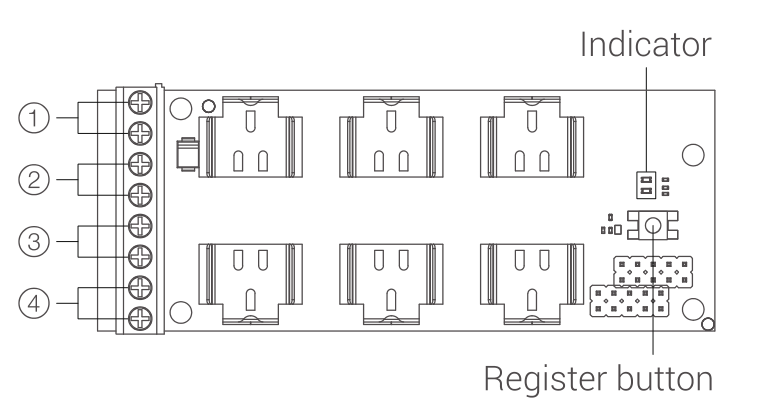
1. Appearance
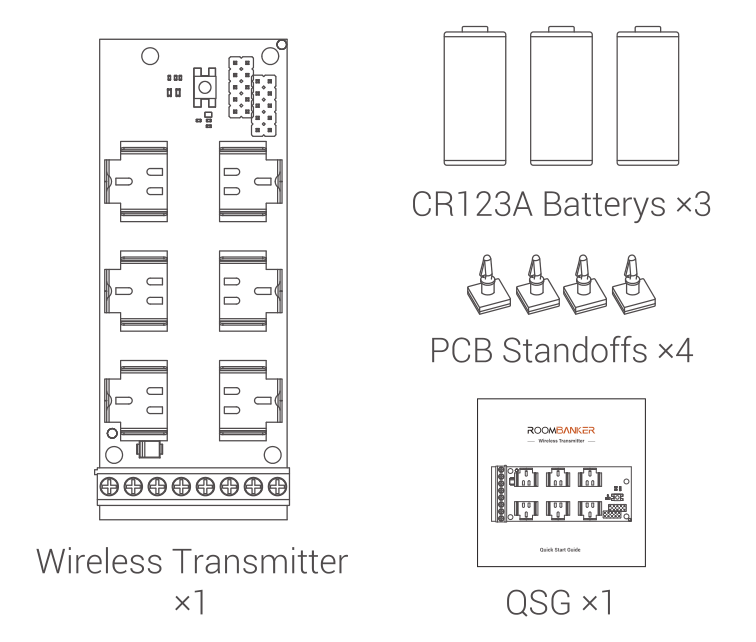
2. Packaging List
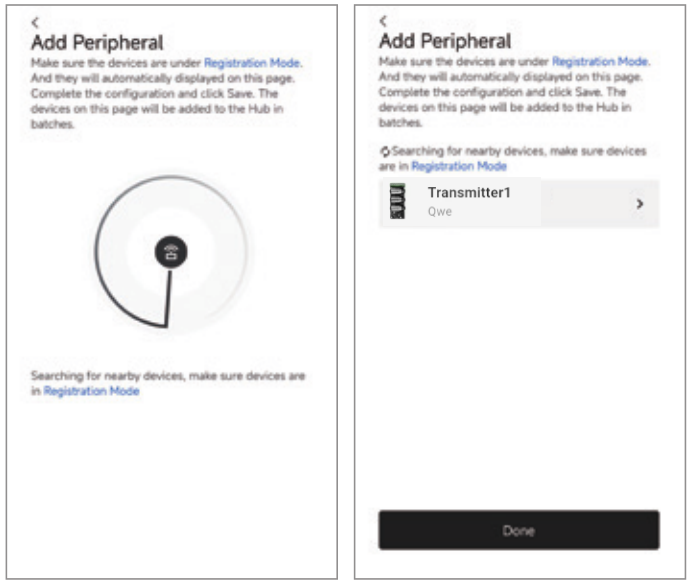
3. Add Device
- Click Home Security Hub, then click "+" and select "Add peripheral".
- Pop in three batteries to power up the device, the green indicator will flash and the device will show in the App.
Note: If the device does not show in the App and green indicator is off, please press and hold the register button for 5s to try again.
- Assign a room and click the "Done" to finish adding.
4. Testing Instruction
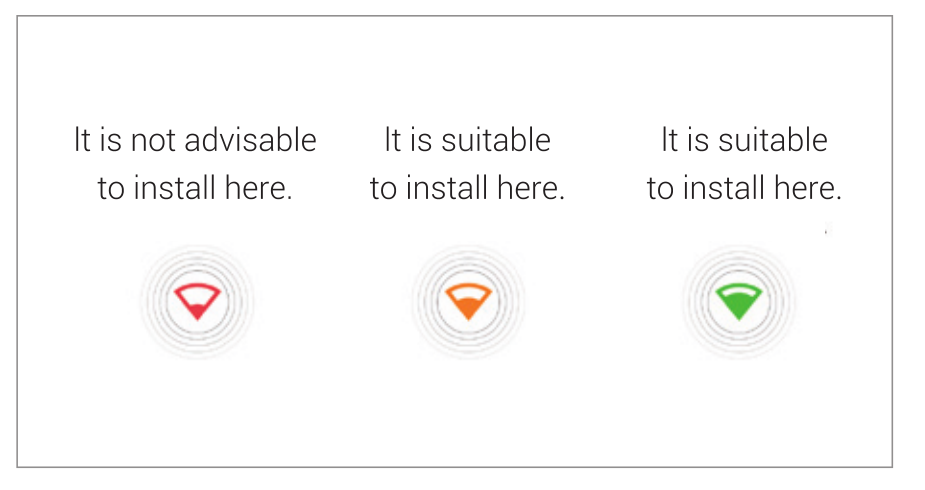
Signal Strength Test
Click“Settings->Signal Strength Test”to check signal strength.
Find me
Click“Settings->Find me”to check.
The device indicator flashes green (1 second on / 1 second off) until the 30-second timeout expires.
5. Working Principle
Transmitter is a module for integrating a third-party wired device into the Roombanker system. Transmitter allows you to connect the detectors, keypad, panic button, or any other device with the NC/NO contact type to Roombanker. Transmitter can output the NC/NO signal to the third-party device.
6. Base Operation
6.1. Terminals for wired device connection
| Parameter | Value |
|---|---|
| + – | 3.3 V / 30 mA power supply output for connecting a wired device. |
| PO+ PO- | Programmable output, open-collector, need external pull-up resistor. |
| ALARM | Inputs for connecting a wired device. |
| TAMP | Inputs for connecting a tamper of a wired device. |
6.2. Device configuration
| Parameter | Value |
|---|---|
| External Detector Type | Bistable, Pulse |
| Power Output | 1. Always enabled(Keep output under any circumstances) 2.Disabled if disarmed (Cut off power output in disarmed state) 3.Always Disabled(Cut off output under any circumstances) |
| External Device Mode | 1.Normal Close: NC (A normally - closed signal input indicates a normal state; an alarm is triggered otherwise.) 2.Normal Open: NO (A normally - open signal input indicates a normal state; an alarm is triggered otherwise. This is the default mode.) |
| Alarm Signal Output | 1.Normal Close:NC (Under normal circumstances, a low - level output is provided. In case of an alarm, a high - level output is provided for x seconds. This is the default mode.) 2.Normal Open:NO (Under normal circumstances, a high - level output is provided. In case of an alarm, a low - level output is provided for x seconds.) 3.DISABLE (Disable this function, no signal output) Remarks: x value:0 represents continuous output, and 1 - 255s indicates the duration of continuous output. |
| Tamper Settings | 1.Normal Close: NC(A normally - closed signal input indicates a normal condition; an alarm is triggered otherwise. This is the default mode.) 2.Normal Open: NO(A normally - open signal input indicates a normal condition; an alarm is triggered otherwise.) 3.DISABLE: (Disable this function and do not detect signal input.) |
6.3. Event types
| NO. | Type | Value | Meaning |
|---|---|---|---|
| 1 | Device | Intrusion | Trigger an alarm on motion, door/window opening, or activation of other detectors. |
| 2 | Device | Fire | Generate an alarm when fire detectors are activated. |
| 3 | Device | Auxiliary alarm | Trigger an alarm when the auxiliary request button is pressed. |
| 4 | Device | Panic button | Activate an alarm upon pressing the panic button. |
| 5 | Device | Gas alarm | Alarm when gas concentration is exceeded. |
| 6 | Device | Leakage | Alarm triggered by water leakage detectors. |
| 7 | Device | Glass break | Alarm triggered by the glass break sensor. |
| 8 | Device | High temperature | Trigger an alarm when the upper temperature limit is exceeded. |
| 9 | Device | Low temperature | Activate an alarm when the lower temperature limit is breached. |
| 10 | Device | Masking | Alarm triggered when device masking is detected. |
| 11 | Device | Duress code (opening) | Alarm upon entry of duress code. |
| 12 | Device | Vibration | Alarm when the vibration sensor is activated.This event type is only available under Pulse mode. |
| 13 | Device | Custom | User-configurable event type. This event is not transmitted to the security company’s monitoring station. |
7. Device Specifications
| Parameter | Value |
|---|---|
| Model | RBAD-TR1-868 \ RBAD-TR1-915 |
| Advanced Features | Signal Strength detection, Find me |
| Transmission Technology | RBF Wireless Transmission |
| Transmission Frequency | 868 / 915 MHz |
| Cable length | 130 m |
| Wireless signal range | Up to 1,500 m in an open space with hub |
| LED Indicator | 1 |
| Device certifications | FCC/CE/RoHS |
| Operation Temperature | From -20 °C to +65 °C(-4 °F to 149 °F) |
| Operation Humidity | Up to 90% |
| Storage Temperature | From -20 °C to 65 °C (-4 °F to 149 °F) |
| Maximum Operating Current | 72 mA |
| Quiescent Current | 11 uA |
| Dimension (W x H x D) | 100 mm x 41 mm x 23 mm |
| Weight | 33 g(No battery) |
| Power Supply | CR123A Battery x 3 |
| User Serviceable Parts | External plug:Battery CR123A x 3 |
| Application Scenario | Indoor |